Identify the part.
Start with the weird thing in your hand. PartSnap gives possible clues, shows what proof is missing, and keeps fitment verification in front of the tech.
Snap the part. Check the code. Save the job. SplashLens gives pool and spa pros a cleaner next move before anyone guesses, orders blind, or has to rewrite the stop later.
One wrong part order can cost a truck roll, a callback, and a customer who tells three people. SplashLens costs less than one.

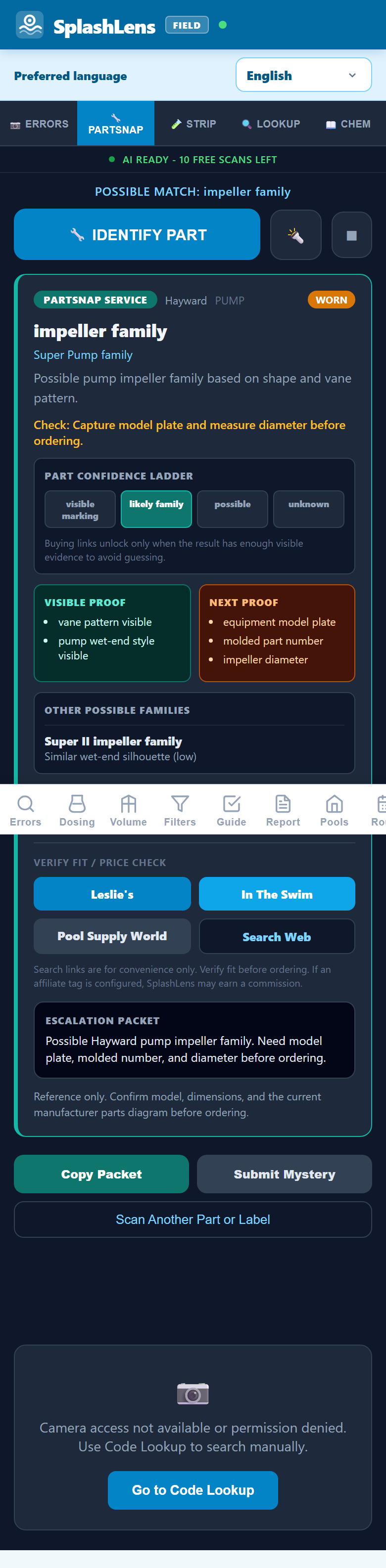
PartSnap stays cautious: possible match, proof still needed, then cleaner details for the boss, counter, or vendor.
New: Closing Season Mode
When Midwest routes shift into closings, repairs, winterizing notes, odd parts, and last-minute callbacks, SplashLens helps techs document the stop before the phone starts ringing again. Try one closing stop now, before the first hard freeze turns a missed note into a spring argument.
Start with the weird thing in your hand. PartSnap gives possible clues, shows what proof is missing, and keeps fitment verification in front of the tech.
Save photos, readings, notes, and a plain-English explanation before the stop disappears into camera roll chaos.
Copy clean details for a boss, senior tech, supplier, trainer, or facility contact instead of another vague text thread.
Free lookup stays free. Paid lanes are for teams, facilities, trainers, distributors, and manufacturers when the proof needs to be saved, reviewed, taught, or verified.
SplashLens keeps the deep tech tools available, but the first screen should match the person holding the phone.
A tech sees PartSnap. The boss sees clean job details. A facility operator sees the simple wizard. That is the product story.
Open PartSnap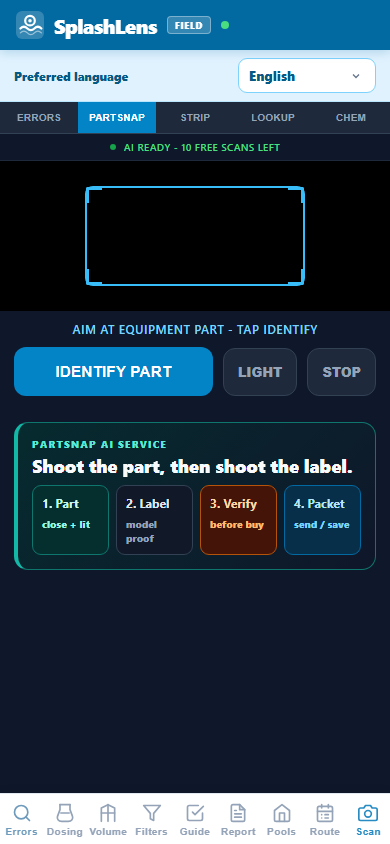
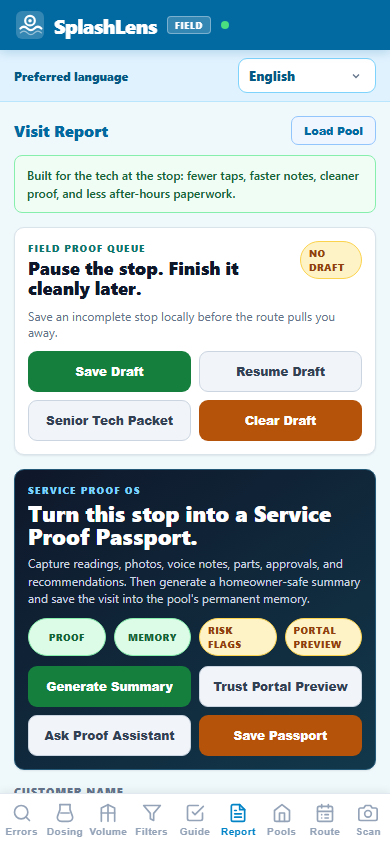
SplashLens turns the messy stop into a repeatable loop: name the likely part or issue, collect proof, explain the next move, coach the tech, and keep the history findable.
Photo an impeller, seal, grid, valve, salt cell, robot part, fitting, basket, gauge, O-ring, control label, or pump-pad component. PartSnap returns possible matches, missing proof, and safer search terms so the tech can verify before ordering.
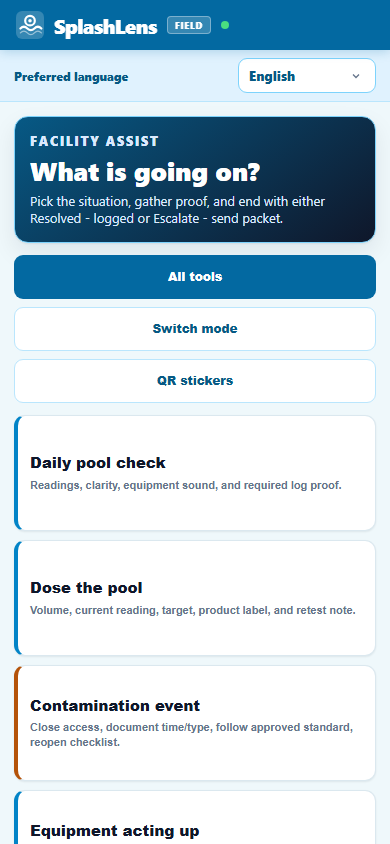
Swim schools, apartments, hotels, and aquatic facilities need fast documentation and escalation, not a repair-tech rabbit hole.
Facility Assist is being kept as a partner-led access lane while the workflow is shaped with CPO educators, facility operators, and support partners: daily checks, chemical dosing, contamination-event documentation, basic equipment proof, and support escalation.
The field is moving into smart robots, app-connected automation, variable-speed pumps, heat pumps, lighting systems, chemical controllers, automatic covers, and sensor-driven backyard equipment. SplashLens turns those moving pieces into proof prompts, callback warning signs, training moments, and clean details for the next person helping.
That feeling when the code appears before the escalation call: this is the stop-level relief SplashLens is built for.
SplashLens is the field reference layer for the moment a tech is standing at a pad with a fault, a customer waiting, and no time for vague web results: code lookup, dosing math, dictated service notes, scanner workflows, and offline manual tools in one place. Handle it before the call and look like the tech who came prepared.
Route apps run the company. SplashLens helps when the tech is standing at the pad and needs a clean answer fast.
Photo the weird part, label, plate, or component. SplashLens returns possible ID clues, what still needs to be checked, and clean details to send before anyone orders blind.
Equipment-code lookup, volume, turnover, FC, pH, TA, CH, CYA, SLAM, drain/refill, and report-ready chemistry notes.
Robots, automation, app pairing, RS-485, lighting, heat pumps, covers, Balboa, Gecko, Waterway NEO, and sanitizer hardware lanes.
Manual lookup, calculators, guides, and checklists stay available in the field. Online scans are clearly labeled and require verification.
SplashLens is live on the iOS App Store and Google Play, and the free web app still works from the browser on any device.
On any phone, tablet, or laptop. No download, no login. Just open the URL and you're in.
Install from the App Store or Google Play, or open the web app from any browser. The browser route still supports a full-screen install option when available.
Enter each pool on your route - name, volume, shape, filter type. They're saved to your device. Every subsequent visit, just pick the pool and the calculators pre-fill.
After the first load, SplashLens caches everything to your device. Pull the error code reference at a garage panel with no signal. Run the SLAM calculator in a basement equipment room. It just works.
The big platforms are built for scheduling, billing, CRM, and management. SplashLens is the free field layer a tech opens when a stop is stuck.
| Feature | SplashLens | Route app | Pool CRM | Field-service CRM |
|---|---|---|---|---|
| Price | Free | $1-2/pool/mo | $55/tech/mo | $69+/mo |
| Equipment Error Codes | Yes 230+ current entries | - | - | - |
| Chemical Dosing Calculator | Yes Full | Basic | Yes Auto-dose | - |
| Manual Tools Offline | Yes Cached | - | - | - |
| Filter Reference (Sand/DE/Cart) | Yes | - | - | - |
| SLAM / Treatment Plans | Yes | - | Partial | - |
| Salt Chlorinator Reference | Yes | - | - | - |
| Chemical Safety Guide | Yes | - | - | - |
| Maintenance Checklists | Yes | Yes | Yes | Yes |
| Route / Day View | Yes | Yes Optimized | Yes | Yes |
| AI Equipment Scanner | Yes Online | - | - | - |
| Free manual lookup | Yes | - | - | - |
| Invoicing / Billing | Not our lane | Yes | Yes | Yes |
* Representative service-management pricing varies by plan and team size. SplashLens does not compete with billing - we complement it.
Point your camera at an error display, equipment label, part, or test strip. SplashLens gives a reference path, then asks for verification before repair or ordering decisions.
Aim at the display, get the likely code path, then verify with the manual or qualified tech before repair.
Use it for quick field triage, then confirm with a calibrated kit before dosing.
Photo the unknown part and get safer search terms plus proof prompts before ordering.
AI scan requires internet. Manual code lookup is cached after first load.
Trade coverage gives techs, trainers, and service companies a clean reason to test SplashLens. Coverage is not an endorsement.
AQUA covered SplashLens Closing Season Mode for pool and spa pros documenting winterizing proof before freeze season.
AQUA covered SplashLens as a field-reference app for pool, spa, and facility professionals.
PoolPro covered the SplashLens launch as a free field-reference app for pool service technicians.
Use the app free in the field. Upgrade when you need heavier scanner use, saved job history, team visibility, or training workflows.
Lookup stays free. Upgrade when the app starts saving time, proof, and repeat job history for you or the crew.
Use this when you need a field answer right now.
For the tech who wants unlimited scanning and saved job memory instead of screenshots buried in the camera roll.
After checkout, SplashLens issues a signed scanner activation link for the web app. If browser storage is cleared, use the restore flow with the checkout email.
For owners who want the crew using the same proof habits without rebuilding their route software.
Plain-English version: free lookup gets the tech unstuck. SplashLens Pro is for unlimited scanning and saved job memory. Teams is for owners who want proof habits, company visibility, and training signals. Facility, manufacturer, distributor, and training partnerships stay gated until real partners review the workflow.
Pool service companies can set SplashLens as the standard reference tool for every tech on the roster. Free for individuals. Teams starts at $99/month when a company wants owner visibility, saved proof, and repeat-miss reporting.
Contact us about team deployment ->Core SplashLens tools stay free to start: manual lookup, calculators, checklists, notes, and reference guides. A free field profile unlocks 3 monthly AI scans and gives SplashLens a real contact for misses and feedback. SplashLens Pro is the paid web upgrade for unlimited scanning and saved job memory. Facility/CPO workflows are intentionally gated as a partner-led access lane while training and operator partners shape the workflow.
PartSnap does not guarantee a seller or fit. The safe path is: verify the model plate and part markings, check your normal local distributor or SCP-style counter first, then use any online links as price-check/search help. If affiliate links are configured, they are disclosed, and the tech still needs to verify fit against current diagrams and manufacturer guidance.
When you first open SplashLens, the service worker caches the app, error code data, calculators, and reference tables to your device. Manual lookup and calculators work without signal after first load. AI camera scanning requires internet.
No. Those are service management platforms: billing, invoicing, customer CRM, route optimization. They run the company. SplashLens supports the stop with code lookup, scanner, dosing, reports, and poolside reference. We intentionally do not do billing.
On iPhone, install SplashLens from the App Store. On Android, use the Google Play listing or open app.splashlens.com and use the browser install option when available. The web app remains free for field reference use.
Yes. SplashLens has a dedicated spa and swim-spa lane for Balboa, Gecko, Waterway NEO, Master Spas H2X, Endless Pools, Hydropool, PDC, TidalFit, Bullfrog, Jacuzzi, Sundance, Hot Spring, Caldera, covers, lifters, weak jets, no heat, GFCI trip timing, sanitizer/feeders, ozone, UV, AOP, and swim-current pump proof. It is a field reference, not a replacement for current manuals or qualified electrical/heater service.
Hayward (TriStar, Super Pump, MasterTemp, OmniLogic), Pentair (IntelliFlow, IntelliFlo, MasterTemp, EasyTouch), Jandy (iAqualink, JXi), Zodiac, Maytronics/Dolphin, Polaris, Kreepy Krauly, Waterway, Balboa, Gecko, Master Spas/H2X, Endless Pools, Hydropool, Jacuzzi/Sundance, Hot Spring/Caldera, and more. Beatbot and Betta robotic cleaners are in the current expansion.
Error Scan, PartSnap, and Test Strip reader are live online. Error Scan attempts to read pool equipment displays and returns reference causes plus next checks. PartSnap suggests possible part IDs and search terms. Test Strip reader estimates readings for quick field triage. Without internet, use manual lookup and manual entry.
Pool profiles, chemistry history, and route data live on your device in localStorage. AI scan images are sent to the scanner endpoint only when you use the online AI feature. Free scanner profiles capture email, optional name/company, and scanner usage so SplashLens can track free scan limits and follow up on field misses. Customer lists are not synced to a backend account.
Open SplashLens right now. No signup. No install. Just open it. For details, read the full FAQ.
Open SplashLens Free
Training partners, owners, and senior techs can turn PartSnap misses, facility incidents, and proof packets into five-minute review cards.